
How to track your child’s vaccinations in Kidzia
Select your child, open Vaccinations and record the doses they actually received. This guide explains how to keep their vaccination record organized in Kidzia.
Steps reviewed:
Select your child and open Vaccinations
On the home screen, check that the correct child is selected, then open the Vaccinations card to reach the vaccination journey.
Check: Each child has a separate record. Check the selected profile before saving a dose.
Link to this stepFind the relevant dose
Doses are organized by age. Switch between All, Mandatory and Optional, then tap a vaccination card to see its details.
Check: A past due date does not mean a dose was received; its recorded status is separate.
Link to this stepRecord a dose your child received
Open the dose details and choose Record dose. Enter the actual date it was given and save. If you know it was given but do not know the date, use the option to document it without a date.
Check: Check that the dose is marked completed. Do not enter an estimated date as a confirmed date.
Link to this stepDocument earlier vaccinations together
When the earlier-vaccinations prompt appears, open it and select only the doses your child received. Choose Dates are not known precisely when dates are unavailable. Use Received on schedule only when the doses really were given on those dates.
Check: Review your selection before confirming. Unselected doses stay unchanged, and you can document just some doses.
Link to this stepCorrect an accidental entry
Open a recorded dose and choose Undo vaccination, then record it again with the correct date if needed. A vaccination you added yourself has a Delete vaccination option.
Check: This changes your Kidzia record only. Keep your vaccination card and provider’s records as the reference for doses actually given.
Link to this stepCheck notification permissions
Allow notifications for Kidzia in your phone settings if you want reminders. Check your child’s birth date and record, and keep the appointment confirmed by your clinic or doctor.
Check: Reminder delivery depends on phone permissions and settings. Continue confirming appointments with your provider.
Link to this step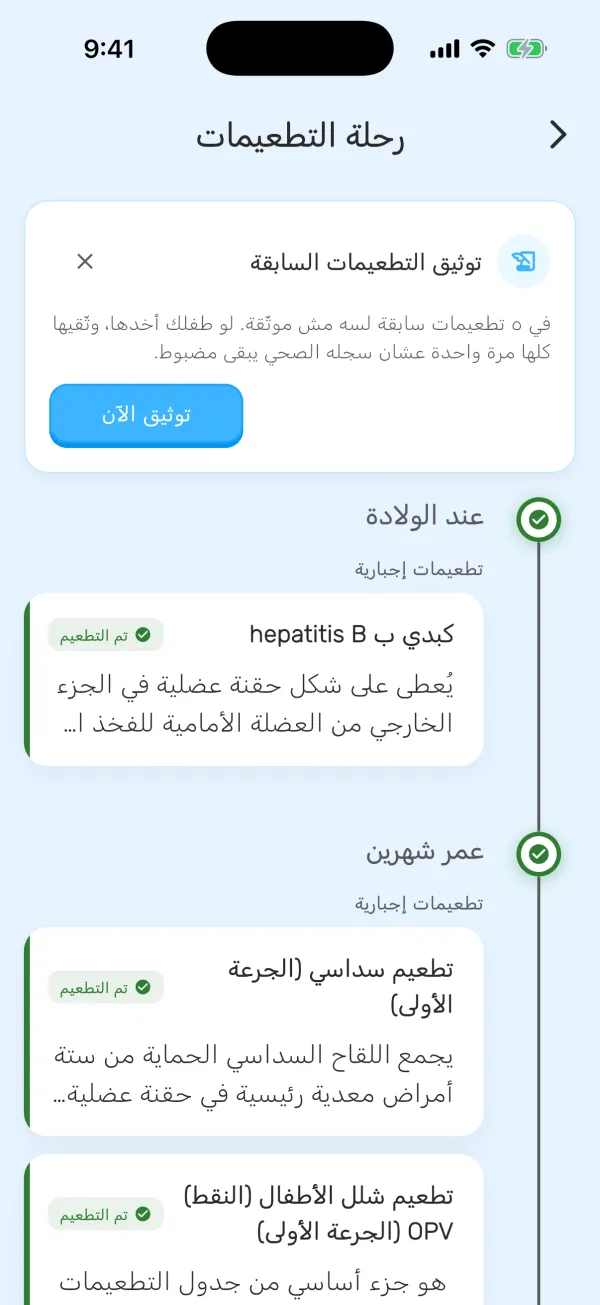
Common questions
What if I know a dose was given but cannot remember the date?
Use the option to document it without a date, or Dates are not known precisely when recording earlier doses. Mark a dose received only when you are sure; otherwise check the vaccination card or provider.
Why is an older dose still showing as unrecorded?
Kidzia does not assume a dose was given because its date has passed. Document it if it was given. For a missed or uncertain dose, ask your clinic or doctor what to do next.
Can I use this outside Egypt?
Kidzia displays an Egyptian schedule, which may differ from your local schedule. Use it to organize your records and confirm doses and appointments with your local health provider.
What if my child’s details are missing or a record will not save?
Check that you are signed in, the correct child is selected and their details are complete. Check your connection after a saving error, then reopen the record before trying again. Contact support if it continues.
A clearer step every day with Kidzia
Milestones, feeding guidance, sleep support, and hands-on activities all in one app.